# Automatic films
Markdown version of .
`immich-memories auto run` is the single daily entry point. It chooses one memory worth making today: a recent trip, a birthday, last month's highlights or a year you have not cut yet. If nothing qualifies, it skips the day.
Make and review a few films manually first. Set [home and people](https://sam-dumont.github.io/immich-memories/docs/get-started/who-is-who.md), then check **Suggestions** to see what it would choose.
**Diagram: Once a day it checks what's due and makes one film at most.** [(image)](https://sam-dumont.github.io/immich-memories/diagrams/seq-scheduled-run.svg)
```text
┌──────────────────────────────────┐
│ A timer fires │
│ in-process, auto run, │
│ or POST /api/trigger │
└─────────────────┬────────────────┘
│
│
│
│
▼
┌──────────────────────────────────┐
│ │
│ Another run │
│ holds the lock? │
└──────────────────────────────────┘
│
│
├──────────────────────────────────────┐
│ │
▼ ▼
┌──────────────────────────────────┐ ┌─────────────────────────────────────┐
│ │ │ │
│ │ │ Cooldown │
│ stops │ │ still active? │
│ HTTP: 409; no attempt written │ │24 h by default, skipped when forced;│
│ │ │ pending uploads retried first │
└──────────────────────────────────┘ └─────────────────────────────────────┘
│
│
┌──────────────────────────────────────┤
│ │
▼ ▼
┌──────────────────────────────────┐ ┌─────────────────────────────────────┐
│ │ │ Nothing due? │
│ skipped │ │ month, trip, season, holiday, album,│
│ cooldown active │ │ person month, or a month never made │
└──────────────────────────────────┘ └─────────────────────────────────────┘
│
│
┌──────────────────────────────────────┤
│ │
▼ ▼
┌──────────────────────────────────┐ ┌─────────────────────────────────────┐
│ │ │ │
│ skipped │ │ The film run │
│ no eligible candidates, │ │ fails? │
│rare: old months fill quiet nights│ │ generate --source=auto │
│ │ │ 2 h limit │
└──────────────────────────────────┘ └─────────────────────────────────────┘
│
│
┌──────────────────────────────────────┤
│ │
▼ ▼
┌──────────────────────────────────┐ ┌─────────────────────────────────────┐
│ failed │ │ Completed │
│ from the second failure: │ │ one film, uploaded │
│ 24 h, 3 days, 7 days │ │ if you asked │
└──────────────────────────────────┘ └──────────────────┬──────────────────┘
│
│
│
│
│
┌──────────────────────────────────┐ │
│ Notification │ │
│ success or failure, │◄────────────────────┘
│ if notifications are on │
└──────────────────────────────────┘
```
Arrows:
- A timer fires → Another run holds the lock?
- Another run holds the lock? → stops
- Another run holds the lock? → Cooldown still active?
- Cooldown still active? → skipped
- Cooldown still active? → Nothing due?
- Nothing due? → skipped
- Nothing due? → The film run fails?
- The film run fails? → failed
- The film run fails? → Completed
- Completed → Notification
## Docker: switch on the built-in timer
If your manual film completed, its required models are ready. Otherwise, finish
[the first-film walkthrough](https://sam-dumont.github.io/immich-memories/docs/get-started/first-film.md) before enabling the timer.
In `docker-compose.yml`, add these two lines under the app's `environment:` block:
```yaml
IMMICH_MEMORIES_AUTOMATION__ENABLED: "true"
IMMICH_MEMORIES_AUTOMATION__DAILY_AT: "09:00"
```
Change the time there, then recreate the container:
```bash
docker compose up -d
```
The time uses the container's timezone (`TZ`). Upload is a separate choice: `upload.enabled: true` turns on delivery for manual and automatic films alike, and `upload.album_name` names the one destination album. An uploaded film carries its title as its Immich description and is tagged with the release that made it and the day; `upload.film_tags: true` also tags it with its type, years and stories. Leave `upload.enabled` false to keep films on disk. A key missing an upload permission still gets a completed film, kept locally with the reason named; [upload permissions and retries](https://sam-dumont.github.io/immich-memories/docs/reference/automation-contract.md#docker-switch-on-the-built-in-timer) covers what happens next.
Or omit those Compose lines and save **Settings > Automation > enabled** and
**daily\_at**. Settings also holds the other automation options; file and environment values win.
## Bare metal: auto install
```bash
immich-memories auto install --hour 9
```
This writes a user timer on macOS or Linux and prints its activation command. Run **Activate:** to start it; installation alone does not activate the schedule. On headless Linux, run `loginctl enable-linger "$USER"` so the timer survives logout. Run **Deactivate:** before `auto install --uninstall`, which only deletes files. Scheduled jobs do not inherit your interactive shell's credentials: keep them in the configuration. A scheduled run keeps its history and logs with the config it was installed with, [same as the store](https://sam-dumont.github.io/immich-memories/docs/run/config-file.md#where-the-store-and-logs-live), so another `--config` keeps its own history. The managed timer is shared by that operating-system user: installing another config replaces the existing schedule. On macOS, `auto install` also re-enables the job's launchd label if an earlier `launchctl disable` left it off. [Scheduler details](https://sam-dumont.github.io/immich-memories/docs/reference/automation-contract.md#bare-metal-auto-install) cover the launcher, environment and missed runs.
**On a Mac with Immich on your network, allow Local Network for the interpreter.** macOS blocks a program's connections to your LAN until it is allowed, and the permission belongs to the resolved Python the job runs, not to Terminal. A launchd job at 03:00 has nobody to answer a prompt, so the default is no and the run fails with `No route to host`. `auto install` checks it through launchd itself (a temporary agent that only pings Immich). Run it at the Mac so you can click **Allow** if macOS asks, then run `auto install` again. A failed check alone does not prove a permission denial: check the config, key and server connection too. `auto status` tells you when an upgrade moved the interpreter, which brings the question back. [macOS and an Immich on your network](https://sam-dumont.github.io/immich-memories/docs/run/reference/python-install.md#macos-and-an-immich-on-your-network).
### Where a scheduled run's logs go
Every attempt that starts a film keeps its full output, credentials redacted, in
`~/.immich-memories/cache/automation-output/.private.log`. It's your file (mode 0600):
no sudo, no journal access needed. **Runs** in the web UI has a download button for it too.
```bash
immich-memories auto status # scheduler in use, last attempt, outcome and reason
ls -t ~/.immich-memories/cache/automation-output/ | head -1 # newest transcript
```
That path moves with `cache.directory` if you changed it. A day skipped before any film starts (cooldown, every candidate rejected) leaves no
transcript: `auto status` says why. A period with nothing worth a film, or with no pictures at all, ends as one `skipped` attempt with that reason (`nothing worth a film: no pictures or videos in this period` for an empty one): no film is counted and the cooldown stays free.
The scheduler's own wrapper output goes elsewhere. On macOS it lands in
`~/.immich-memories/logs/auto.log` and `auto-error.log`. On Linux the systemd unit sends it to your
user journal: `journalctl --user -u immich-memories-auto.service` works only if your distribution
keeps per-user journals or you're in the `systemd-journal` group. On a stock Ubuntu account that
answers "insufficient permissions", so read the transcript above instead.
## How it picks one memory
It ranks suitable memories and avoids repeating the same category or person too often. That choice selects the subject; the normal editor still chooses the shots. Trips wait until after you are home and birthdays wait a little for phone uploads. A person is only suggested when they have pictures in the period the film would read (last year for a spotlight), and the count shown is for that period, not their lifetime.
Besides those, it can propose the season that just ended, a holiday your pictures show you keep (the day stands out from the days around it in at least three years), across every year you photographed it, a new or grown album, and months that never got a film. It films the last month of each person close to you, and weighs birthdays and spotlights by how close each person is, so a trip outranks the birthday of someone who isn't close to you. Each is a switch under `automation:` in the [config reference](https://sam-dumont.github.io/immich-memories/docs/reference/config-reference.md#automation); the [automation reference](https://sam-dumont.github.io/immich-memories/docs/reference/automation-contract.md#how-it-picks-one-memory) lists the thresholds. A season needs your home base, since the hemisphere comes from it.
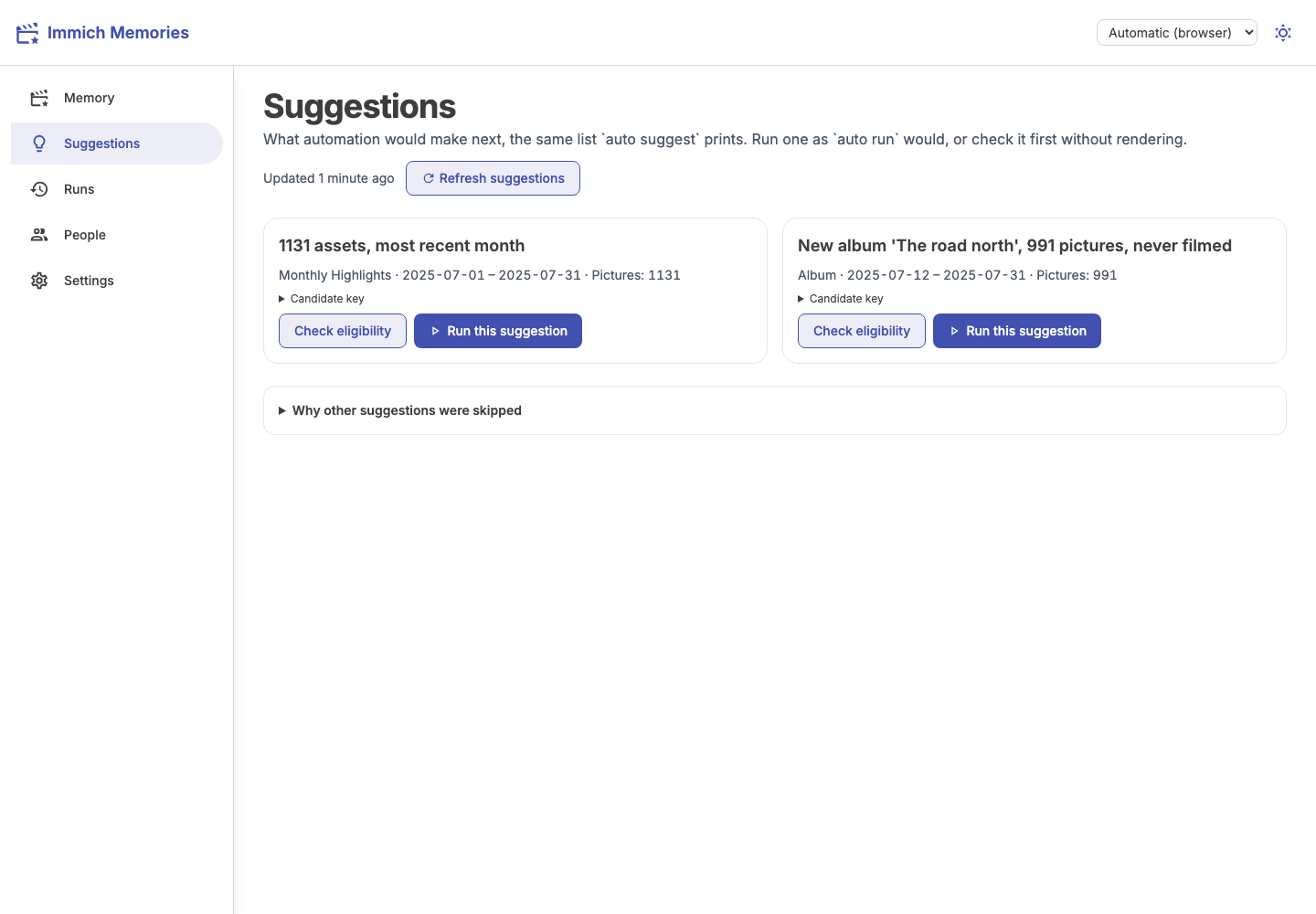
**Suggestions** shows each reason. **Check eligibility** previews the checks without rendering, and **Run this suggestion** makes that candidate now. A manual request still respects the rotation rules, but not the daily cooldown: you asked for this film. It doesn't start the cooldown either, so the next scheduled film still comes on time. `immich-memories auto run --force` does the same from a terminal. A check is a dry run: it shows up in the history, and the day's scheduled film still runs at its time.
The page and `immich-memories auto suggest` show up to ten candidates by default, in the same
order for the same library and history. The page keeps its last result and shows when it was
computed; use **Refresh suggestions** after changing your library or making a film.
Every enabled detector that finds nothing gives a reason: no pictures, an existing film,
too little material or missing setup. The page lists these under **Why other suggestions were
skipped**. The CLI prints them above its table. Use `auto suggest --json` for scripts that need
the candidate keys, or `--limit 20` to see more candidates.
Completed manual films count as already made for the same people and calendar window,
including older runs saved with whole-day timestamps. A reviewed cut without a rendered film
does not count. Albums filmed by hand count as already made for their recorded date span. An automatically
filmed album can return when it gains at least 30 pictures and reaches 1.5 times its previous
size.
## Check on it
Open **Runs** for completed films and failures. On the CLI:
```bash
immich-memories auto status
immich-memories auto history --limit 5
```
For a safe preview:
```bash
immich-memories auto run --dry-run
```
Automatic birthday films cover the completed birthday-to-birthday year, both birthdays included. Their title names
the birthday being celebrated: "Kit's birthday · 2026". A film of the birthdays themselves, across
the years, is [asked for by hand](https://sam-dumont.github.io/immich-memories/docs/reference/film-types.md#birthdays).
## Get told when it runs
Notifications support ntfy, email, Discord and other [Apprise](https://github.com/caronc/apprise) targets, off by default. Configure the URLs, then test them:
In Docker, first [set `IMMICH_MEMORIES_SECRET_KEY` in `.env`](https://sam-dumont.github.io/immich-memories/docs/run/config-file.md#secrets-in-the-database)
and recreate the container. Then save **Settings > Notifications > enabled** and **urls**.
The URLs contain credentials, so saving them needs that encryption key. YAML is another route:
```yaml
advanced:
notifications:
enabled: true
urls:
- "ntfys://ntfy.sh/my-topic"
```
```bash
immich-memories auto test-notification
```
The test sends a message to each configured target, and exits 1 when nothing was sent (notifications off, no URL, or a target that refused). Successful films made by `generate`, `auto run`, the built-in timer, **Render** in the app or `runs render` send a completion message. Saving a cut without rendering sends none. The failure message comes only from the automation runner, and only once it has picked a candidate to run for the day. A day skipped before that (cooldown, no eligible candidate) sends nothing. Thumbnails remain off unless you enable them. Use a private, authenticated ntfy topic: public ones can be read by others. [What each message carries](https://sam-dumont.github.io/immich-memories/docs/reference/automation-contract.md#get-told-when-it-runs) covers the full payload.
After an upload, the success message includes a direct link to the film in Immich. If the app talks to
Immich through a container or cluster address, set `immich.public_url` to the address your browser opens:
```yaml
immich:
public_url: "https://photos.example.com"
```
This also sets the app's **Open in Immich** links. `auth.public_url` is a separate setting for the
Immich Memories app itself.
## Trigger it over HTTP
[The trigger API](https://sam-dumont.github.io/immich-memories/docs/reference/automation-contract.md#trigger-it-over-http) is for Home Assistant, shortcuts or another scheduler. It asks automation to choose a memory; it does not film whichever album caused the trigger. Add `?force=true` when you're asking for a film by hand: it skips the cooldown and doesn't push back the next scheduled film.
The [automation reference](https://sam-dumont.github.io/immich-memories/docs/reference/automation-contract.md) covers scores, rotation, delivery retries, tokens, HTTP responses, multi-account scope and Kubernetes. [Configuration keys](https://sam-dumont.github.io/immich-memories/docs/reference/config-reference.md#automation) have the defaults.