# Use the web UI
Markdown version of .
The browser gives you a contact sheet to review and edit before rendering. Every cut and render uses the same engine as the CLI; **Copy as CLI command** gives you the command behind the job.
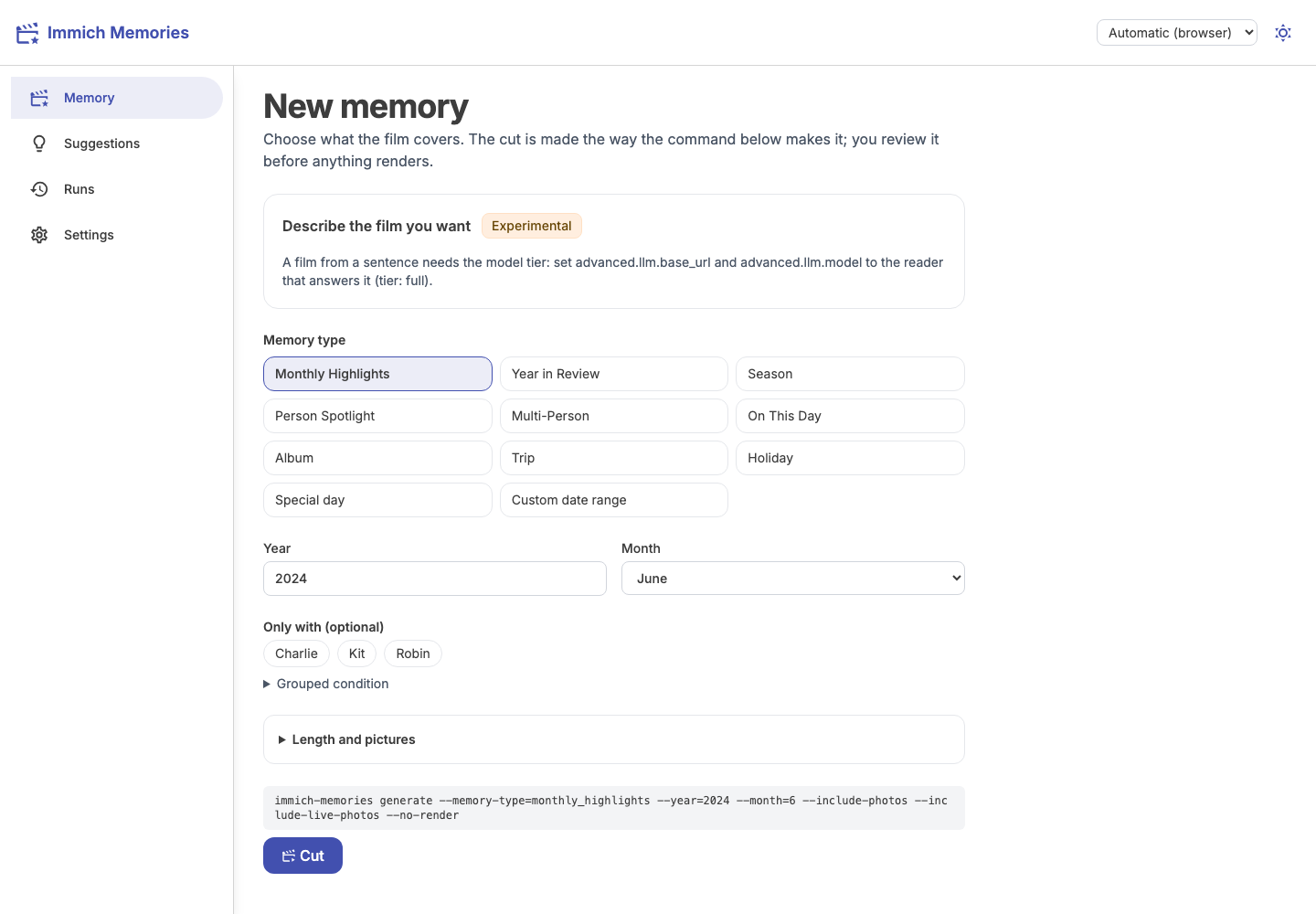
## Where things are
| Page | Use it to |
| - | - |
| **Memory** | Choose a film and start its cut. |
| **Suggestions** | See the memories automation would make next, and why. |
| **Runs** | Review cuts, save revisions and render films, including automatic runs and failures. |
| **People** | Say whose library it is, name how people relate, accept the relationships the tree implies, answer the twin and duplicate flags, link a person across accounts, and save people groups. |
| **Settings** | Change configuration, run the checks and look for a new release. |
On a phone, the navigation is at the bottom. Theme and interface language are remembered in that browser. The interface language does not change the film's language: [titles and languages](https://sam-dumont.github.io/immich-memories/docs/reference/output-rendering.md#languages).
The picture inspector shows the saved caption when the run recorded one. A GPU-tier cut can use
captions while the rules choose its shots; **Model polish** separately records the reader's editing
decisions. A run can report that captions were read without having saved their text.
## Download models on first start
If pinned models are missing or fail their checksum, **Memory** and **Settings** show a
**Download models** card. It lists the files needed by your configured tier, their approximate
download sizes, source hosts and SHA-256 pins. The optional Docling snapshot shows its fixed
revision instead. Hosts can redirect downloads to their CDNs.
Press **Download models** to run the same `immich-memories models fetch` command the terminal
uses. Nothing downloads from merely opening the page. The job shows the current artifact,
can be cancelled and survives closing the tab. A failed download keeps its error visible;
retrying reuses files that already match their pins. Settings changes refresh the list; if another tab changes the download plan, the server
asks you to review it again before starting. This action does not change
`allow_model_downloads` or enable the reader.
The job downloads model weights and WordNet, not photos from your library. It still needs a
writable model cache, enough free space and access to the listed hosts. Optional model
runtimes must already be installed; downloading their weights does not install Python extras.
## Make and adjust a film
**New memory** opens on the memory types, then the options for the type you pick, then **Cut**. Under the form sits **Describe the film in your own words**, a closed section with an Experimental badge: it makes a film from a sentence, and needs the Full tier ([how it works](https://sam-dumont.github.io/immich-memories/docs/make/free-text.md)). Open it once and the page keeps it open in that browser.
[Your first film](https://sam-dumont.github.io/immich-memories/docs/get-started/first-film.md) walks through the whole process with a small album. [Choose a film](https://sam-dumont.github.io/immich-memories/docs/make/memory-types.md) covers trips, people, albums and other types.
**Diagram: Cut first, look at it, then render. Nothing renders until you press the button.** [(image)](https://sam-dumont.github.io/immich-memories/diagrams/seq-web-job.svg)
```text
┌────────────────┐ ┌────────────────────┐ ┌─────────────────┐ ┌────────────────────────┐ ┌────────────────┐ ┌────────────────────┐
│ 1 Describe it │ │ 2 Cut │ │ 3 Look │ │ │ │ │ │ │
│pick the memory,├─►│generate --no-render├─►│ a contact sheet ├─►│ 4 Render ├─►│ Your film ├─►│ Back into Immich │
│ press Cut │ │ live progress │ │ of every shot │ │ runs render │ │play or download│ │if you ticked upload│
└────────┬───────┘ └──────────┬─────────┘ └────────┬────────┘ └────────────────────────┘ └────────────────┘ └────────────────────┘
│ │ │
│ │ │
│ └───────────┐ └──────────┐
│ │ │
│ │ │
│ ┌────────────────────┐ │┌─────────────────┐ │┌────────────────────────┐
│ │ │ ││ Cancel │ ││ Revise │
└─────────►│ busy │ ►│ requests a stop;│ ►│swap, drop or add shots,│
│ one job at a time │ │waits for cleanup│ │ trim a clip │
└────────────────────┘ └─────────────────┘ └────────────────────────┘
```
Arrows:
- 1 Describe it → 2 Cut
- 1 Describe it → busy
- 2 Cut → 3 Look
- 2 Cut → Cancel
- 3 Look → 4 Render
- 3 Look → Revise
- 4 Render → Your film
- Your film → Back into Immich
The cut runs on the server, so you can close the tab and return later. The app follows the running job again. **Cancel** stops it; only one job runs at a time.
The progress panel lists completed, current, pending and skipped phases. Its overall ETA includes
all the phases left in that job; the percentage below it belongs to the current stage. A first
run may not have an overall estimate yet. [Film progress and recovery](https://sam-dumont.github.io/immich-memories/docs/run/film-progress.md)
explains the counts, estimates and what happens after a lost connection.
For a failed job, read the log shown below its status. A full disk can leave the status stale
and the log incomplete. [Free space or expand the volume](https://sam-dumont.github.io/immich-memories/docs/run/maintenance/storage-backups.md#full-disk-during-preparation),
then reload the page and retry the request. Completed preparation facts remain in the store.
When the cut is ready, the app opens its run page under **Runs**. Open a shot to read its explanation or edit it. Use **Pool** to see pictures that did not make it. [Review and adjust](https://sam-dumont.github.io/immich-memories/docs/how-it-chooses/overrule-it.md) explains revisions, missing shots and persistent exclusions.
## Upload permissions
An uploaded film gets its title as its Immich description, in the film's language, followed by its
one-line story summary when `title_screens.llm_titles` is on (experimental). It is tagged
`immich-memories/version/` and `immich-memories/generated-on/`, so you can tell
which release made it and when. With `upload.film_tags: true` it is also tagged under
`immich-memories/` by type, year and story, so you can find every trip film from Immich's tag list. Writing the description
needs `asset.update`; without it the film still uploads, with a warning. A description or tag
that Immich took back while reading the file leaves the delivery pending: upload again, or let
the automatic retry do it for an automatic film, and the label is written once more.
The Render panel checks whether your Immich key has the [upload permissions](https://sam-dumont.github.io/immich-memories/docs/run/docker.md#the-api-key).
If any are missing, **Upload the film to Immich** is unavailable and names them. You can still
render and download the film. A key that could not be checked also leaves only upload unavailable.
An upload requested through saved settings, the CLI or automation does not fail the film when
permissions are missing. The completed file stays local, and the run explains what was not
uploaded. Partial delivery can upload the asset while failing to tag it or put it in an album;
the run keeps the file and names the missing permission. Fix that permission before relying on
Immich delivery. Missing `asset.delete` leaves the previous version in Immich and reports it.
## Find a finished film
**Runs** lists cuts and renders newest first. Open a run to review the cut, render another version or play its film.
The run's details, at the bottom of its page, give the film's path, whether it went to Immich and how long each phase took.
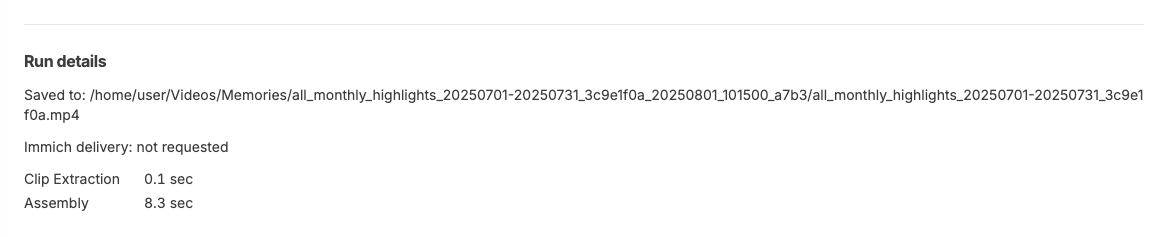
Local films play on the page and have **Download film**. That button is highlighted when a
requested upload could not complete, next to the run's reason. It downloads the finished file,
not a diagnostic report.
After a confirmed upload reclaims the local copy, the run shows **Delivered to Immich** with a
link and still offers **Download film**. The app retrieves that run's recorded original from
Immich using its server-side key; your browser never receives the key. If the film is gone from
both places, the download reports that it is unavailable.
A film rendered without the upload box ticked can still go to Immich later. **Upload to Immich** on the run page sends the file already on disk, with an optional album name, and renders nothing again. It follows the same key check as the render option, so it is unavailable, with the reason, when the key lacks upload scope or the film file is gone. From a terminal: `immich-memories runs upload RUN_ID --album NAME`, where `RUN_ID` is the render run's id (the one with the film), not the cut's. A cut that was never rendered says so and points to `runs render`. Once Immich confirms the upload, the local film is removed (the automation does the same) and the run page says so; a failed or incomplete upload keeps it on disk.
Every run has **Copy report** and **Download report**, including failed runs. Review the redacted report before sharing it in an issue: [report](https://sam-dumont.github.io/immich-memories/docs/make/cli/report.md).
## Change settings
Each setting shows where its value came from. A value set by the environment or `config.yaml` is locked here; change it at that source. Other values can be saved from the page.
A setting with a fixed list of values (the tier, the output codec and resolution, the hardware backend, the title style) is a dropdown, so you can't type a value the app refuses. Each choice has a plain label next to its value, such as "H.264, software (libx264)" or "1080p (1920x1080)"; the labels are in English. A number has its limits (`output.crf` takes 0 to 51), and a value that the environment or the file set to something outside the list still shows, marked "not in the list". `analysis.source_prepare_workers` takes either a number from 1 to 4 or `auto`, so it stays a text box with that hint.
**Checks** lists what loading your config warned about, so you don't need the server log to spot an old or misspelled key. **Run the preflight checks** there runs what `immich-memories preflight` runs.
**Check for updates** asks GitHub once whether a newer release is out and, if so, links its notes and gives the upgrade command for your kind of install. Nothing goes out until you press it. With `updates.check_daily: true` the app checks once a day and shows a banner you can dismiss.
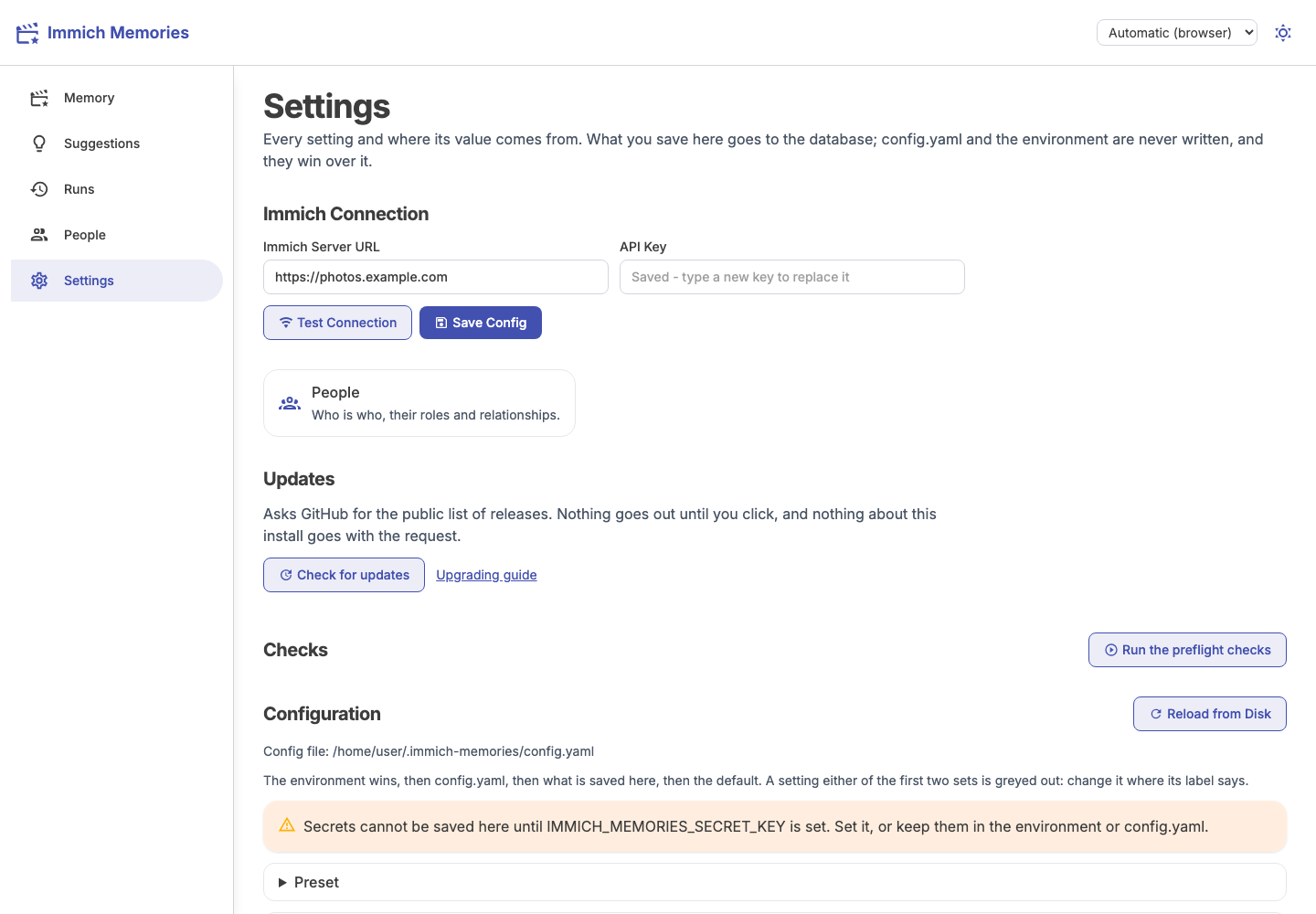
API keys stay masked. To save secrets from the UI, configure `IMMICH_MEMORIES_SECRET_KEY`; keys already supplied through `.env` or `config.yaml` do not need this for normal use. [Configuration and the secret key](https://sam-dumont.github.io/immich-memories/docs/run/environment-variables.md#the-secret-key).
Start with [People and home](https://sam-dumont.github.io/immich-memories/docs/get-started/who-is-who.md), then [titles, maps and music](https://sam-dumont.github.io/immich-memories/docs/make/titles-maps-music.md). Precedence, encryption, caches and job details: [Web UI reference](https://sam-dumont.github.io/immich-memories/docs/reference/web-ui-details.md).
Open a run under **Runs** to render its original cut or any saved revision. **Title style** chooses a named preset, **Auto** or **Random** for this render. The **Render** panel also lets you choose a white or black **Opening and closing fade** for this film. **As configured** uses the saved `title_screens.fade_color` setting. [Titles, maps and music](https://sam-dumont.github.io/immich-memories/docs/make/titles-maps-music.md) covers the lasting default.
What a saved edit accepts, how revisions are kept and what a full cache or output disk returns: [Web UI reference](https://sam-dumont.github.io/immich-memories/docs/reference/web-ui-details.md#input-and-saved-edits).