# Try the demo
**For:** anyone curious, before installing anything for real. **At the end:** wow-stats runs on
your computer with five made-up characters, you've seen the page, the two sites for friends,
and (if you use Claude Code) your assistant answering from the demo data. About 10 minutes.
You need [Docker](https://docs.docker.com/get-docker/) (Docker Desktop on Mac and Windows,
started once so it says "Engine running") and a copy of this repository: `git clone` it, or
download a release's source zip and unpack it. No game, no account.
## 1. Start the page
From the top of your copy (the folder with `README.md` in it):
```sh
cd deploy/compose
cp .env.example .env
```
Open `.env` in any text editor and set `INGEST_PASSWORD` to anything of 12 characters or more.
The demo doesn't use it, but nothing starts without it. No internet on this machine, or a
small one? Also set `MODEL3D=off` and `WOW_ITEMS=off` (no 3D view, no item icons; the
pages still work).
Then start the page. The first time builds the image from your copy, a minute or two:
```sh
docker compose up -d --build ui
```
## 2. Load the demo characters
Mac, Linux, or Git Bash on Windows:
```sh
docker compose exec -T ui python - --vl http://victorialogs:9428 < ../../dev/seed.py
```
PowerShell:
```powershell
Get-Content ..\..\dev\seed.py -Raw | docker compose exec -T ui python - --vl http://victorialogs:9428
```
It prints:
```text
1831 events into http://victorialogs:9428
```
## 3. Look around
Open . The character list at the top has five characters, each with a
DEMO DATA banner:
- **Testchar-Demo**: a Gnome priest who goes from level 22 to 32 over six evenings. Open this one.
- **Testalt-Demo**: a level 11 alt with almost nothing, to see the empty states.
- **Testhunt-Demo**, **Testgun-Demo**, **Testsky-Demo**: three characters dressed for the 3D view.
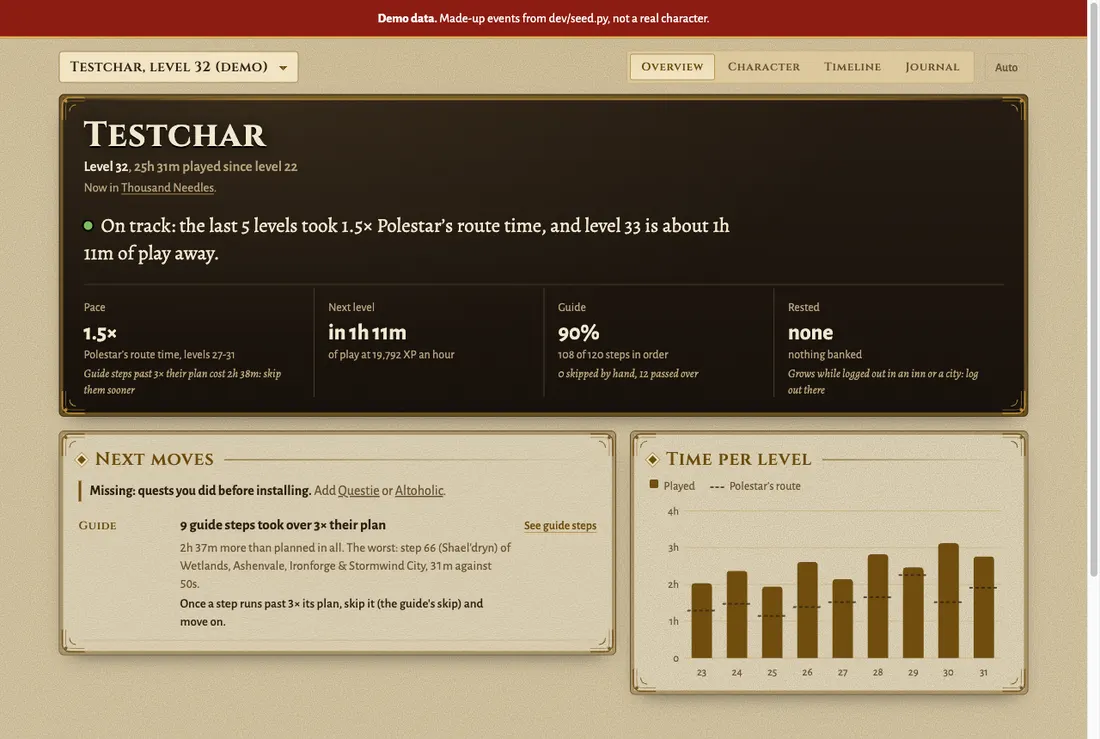
[Your page, tab by tab](https://sam-dumont.github.io/wow-mcp/play/your-page/) explains each tab.
Port 8080 already taken on your computer? `docker compose up` says `port is already
allocated`. Set `UI_PUBLISH=127.0.0.1:18080` in `.env`, run step 1's command again, and open
.
## 4. See the sites for friends
The full view on 8080 is yours. Friends get static copies, rebuilt after each play session:
a public one and a sealed one. Start the two services that build and serve them:
```sh
docker compose up -d publish site
```
Give it a minute (watch `docker compose logs -f publish` until it says it built), then open
: the public site, with only the parts anyone may see. The sealed site
needs its key in the link; print it with:
```sh
docker compose run --rm publish zogzog-key link
```
It prints a link like `http://127.0.0.1:8081/zogzog/#<43 characters>`. Open it: the same page
with the journal, gear advice and prices. Open it without the part after `#`, and it says
"Nothing here." [Share your page](https://sam-dumont.github.io/wow-mcp/self-host/sharing/) explains the two sites.
## 5. Ask your assistant (Claude Code)
With [Claude Code](https://docs.anthropic.com/en/docs/claude-code) on this computer, still in
`deploy/compose`:
```sh
claude mcp add wow-stats -- docker compose -f "$PWD/compose.yaml" exec -T ui wow-stats mcp-stdio
```
Then in Claude Code: "With wow-stats, which level took Testchar-Demo longest, and how much of
it was in a dungeon?" It should come back with level 30, about 3 hours, 44 minutes of it in
Scarlet Monastery: Library. Other assistants: [Connect your AI](https://sam-dumont.github.io/wow-mcp/ai/connect/).
## 6. Clean up
```sh
docker compose down -v
```
That removes the containers and the demo data. `claude mcp remove wow-stats` removes the
Claude Code entry.
## Next
- [Install it for real](https://sam-dumont.github.io/wow-mcp/self-host/install/): the server, the addons and the program on the
computer you play on.
- [Run it on a server](https://sam-dumont.github.io/wow-mcp/self-host/production/): a homelab box with HTTPS, a login, and friends.