Admin overview
For: the owner of a shared install (several people, WOW_STATE_DIR). At the end: you know
where the overview is, what each column means, and what it never shows.
Open https://<your full view>/admin, logged in as yourself. It’s yours alone: anyone else gets
the same “Nothing here” page as any address that leads nowhere, so a friend can’t tell it exists.
A one-person install has no overview (there’s nobody else to look at).
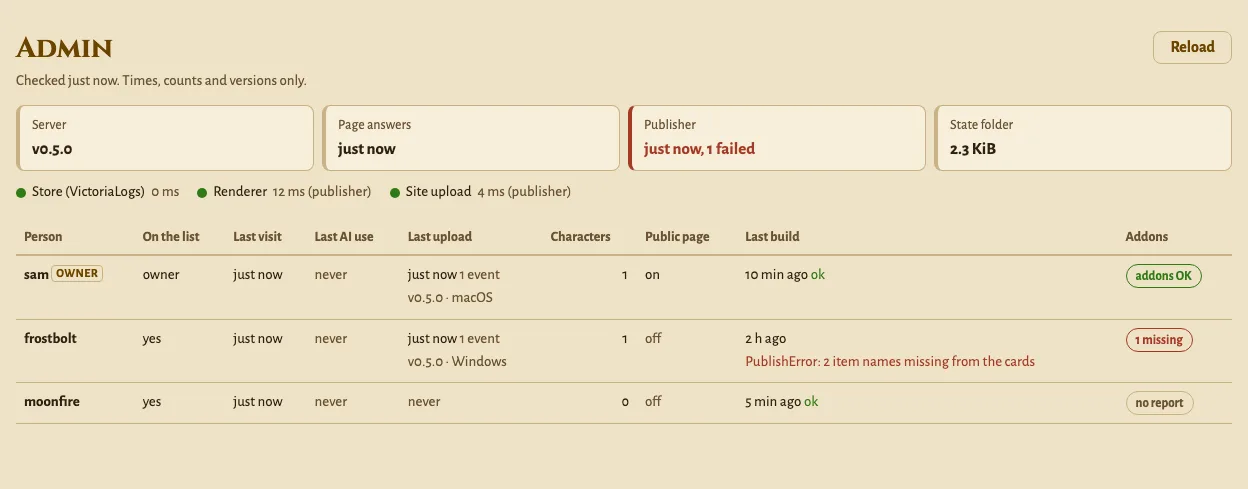
The page is worked out when you open it, at most every 30 seconds. It doesn’t refresh by itself: press Reload.
The strip at the top
Section titled “The strip at the top”| Tile | What it says |
|---|---|
| Server | the version this server runs |
| Page answers | when the full view last built its answers (it rebuilds when new data arrives) |
| Publisher | the publisher’s last pass, and how many sites failed. Red when a site failed or the last pass is more than an hour old |
| Battle.net | the exporter’s last good read, from vm-wow (only with VM_URL). Red after 6 hours |
| State folder | the size of WOW_STATE_DIR |
Below it, the server’s own checks, green or red with the time they took: your store
(VL_URL), the friends’ store (FRIENDS_VL_URL), vm-wow (VM_URL), the static sites
(RENDER_FROM) and the renderer (RENDER_URL). Only what the server is set up with. The
renderer and the static sites’ upload port are usually out of the full view’s reach: those two
come from the publisher’s last pass, marked “(publisher)”. Nothing here calls anything outside
your install.
One row per person
Section titled “One row per person”| Column | What it says |
|---|---|
| Person | the name on the friends list (yours is marked “owner”), with a red flag when something looks stale |
| On the list | yes, no (they left the list and are being removed) or switched off (wow-stats users disable) |
| Last visit | the last time they opened their page (any page or answer of the full view) |
| Last AI use | the last time their AI assistant called the MCP |
| Last upload | when the shipper last sent events, how many, its version and Mac or Windows |
| Characters | how many characters they have. A number, never a name |
| Public page | whether they turned it on in Settings |
| Last build | when the publisher last built their site: “ok”, or the error line |
| Addons | the shipper’s setup report as one badge: “addons OK”, “N missing” (of the two required addons), “Recorder off”, or “no report” |
The red flags:
- no upload for N days: they have a character and nothing arrived for 3 days or more. Either they stopped playing, or their shipper stopped. Ask before you debug.
- shipper older than the server: their shipper’s version is below the server’s. The update line on their start page fixes it.
The shipper’s version comes from its setup report when it sends one, otherwise from the last install or update command they ran. A row without a version or OS is someone who installed before this page existed: it fills in at their next update.
What it never shows
Section titled “What it never shows”No character name, level, zone, gold, quest or anything else from the game. No install code,
upload password, key or sub. The page isn’t logged (the server’s log keeps the path, like any
request).
The visit and AI times are one timestamp each per person, in
users/<account>/activity.json, written at most every 5 minutes and deleted with the person.
Friends read what you see on their privacy page.
For scripts
Section titled “For scripts”GET /api/admin/overview answers the same thing as JSON, to the owner only. The publisher sends
its pass to the full view’s share port (POST /publisher.json, with the share token); set
PUBLISH_REPORT_URL only if that isn’t next to USERS_URL. Every path:
HTTP endpoints.