A second Immich account
Combine people pictures from two Immich accounts in one film. By default, the app reads only your primary account. Connect a second account and explicitly select both when making a people film. The primary remains the only upload destination.
What you need
- An API key from the second account with the ten read permissions, shared with you by its owner. It needs no upload or delete rights.
- Named faces, connected through native identities or explicit account bindings.
- Your primary account already connected and family set up.
The example calls the second account partner; it can belong to another household member and the label does not assign a relationship. Extra accounts are configured in YAML or environment variables. Settings shows the primary
connection only. The second account can be on another Immich server.
The steps
Connect the account, bind matching people once, then make a film with both accounts selected. The setup does not reset or re-tag faces in Immich.
Connect the account
Add the second account alongside your primary connection:
immich:
  url: "https://photos.example.com"
  api_key: "${IMMICH_API_KEY}"
  accounts:
    partner:
      url: "https://photos.example.com"
      api_key: "${PARTNER_IMMICH_API_KEY}"
For Docker, put the second account's key in .env and add this to the service's environment: block:
      IMMICH_MEMORIES_IMMICH__ACCOUNTS__PARTNER__URL: "${IMMICH_URL:-http://immich-server:2283}"
      IMMICH_MEMORIES_IMMICH__ACCOUNTS__PARTNER__API_KEY: "${PARTNER_IMMICH_API_KEY}"
Recreate with docker compose up -d. A line in .env alone does not reach the container.
Test the connection:
immich-memories config test
In Docker, prefix commands with docker compose exec immich-memories.
The output identifies the owner of each key:
✓ Connected as Alex: Server: https://photos.example.com; API: v3
✓ Immich account partner: Connected as Sam: API: v3
The partner line must identify the second account’s owner. If it names you, ask that owner to create a key from their account.
Configuring the account alone does not change a film's source scope.
Native person identities
Native identity support is optional. It keeps both owner keys and the same library merge: Immich hides a partner's favourite flag from the recipient, and timeline settings change which partner assets appear in search. Owner reads keep both signals complete.
immich:
  native_sharing: true
Add this field to the connection block above, then run immich-memories preflight.
The default is false, which keeps existing bindings and makes no native discovery requests.
| Server | Native mode |
|---|---|
| Immich 2.x or 3.0–3.1 | Existing bindings, with an unsupported-feature explanation |
| Immich 3.2.x | Shared recognition IDs within a cluster group; tested on 3.2.4 |
| Immich 3.3 | Experimental people-access discovery; every 3.3 release, and 3.3.0-rc.1 or a later 3.3.0 release candidate |
| Unknown major, newer minor, 3.3.0-rc.0 or a release candidate of any other version | Refused until compatibility is checked |
api_version: v3 does not enable newer endpoints.
Each selected connection reports its actual version. The 3.2 path never calls /people/users.
The selected accounts on each server must belong to the same Immich cluster group.
For 3.3, share the requested people in Immich too; the read role is sufficient.
Discovery uses user.read and person.read, already in the ten read permissions above.
People grants and asset grants are separate. The app does not change either, regenerate
face clusters or enable partner timelines.
A proven shared ID needs only one local binding. This also works with --accounts partner:
a saved primary binding is reused when the partner proves that ID on the same server.
Distinct IDs still need explicit bindings;
names alone never merge people. Native mode verifies requested IDs directly when the roster
omits them. Missing people access, a changed cluster or a failed read stops the run with an
explanation. Disable native mode to use unconnected accounts with existing bindings.
Saved person IDs, groups, relationships and confirmations stay intact. Native access evidence is refreshed for each run and is never exported as a permanent binding. After an upstream merge changes an ID, bind the replacement explicitly to the existing local person. The app will not guess which saved identity should survive.
Only selected owners enter the film. Exact copies retain both owners' stars and faces; similar images stay separate. Downloads, previews, reruns and render workers keep using owner keys. A people condition holds per picture, not per episode: with AND, every named person must be recognised on that same picture, which can span owners when native sharing allows it.
Bind the same person across accounts
Ask the second account’s owner to open the person in Immich and share their ID from /people/<id> in the URL.
Then bind it to the same person in this app:
immich-memories people bind "Alex" --account partner --id <person-id-in-partner-account>
Or use Settings > People > Accounts, choose the account, paste the ID and Bind. The Accounts section appears once a second account is configured.
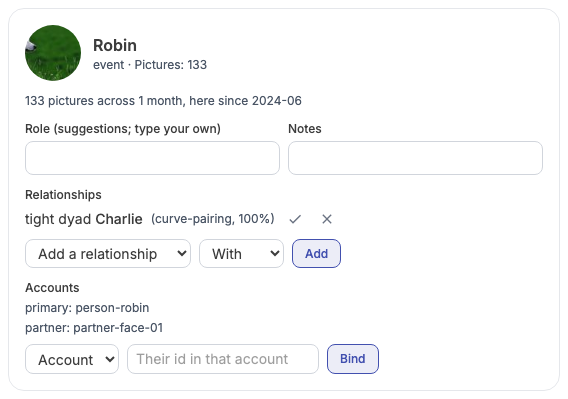
Names are not used to guess identity. A binding preserves the person's confirmed details. An ID already bound to somebody else is refused.
Read both accounts into one film
immich-memories generate \
  --accounts primary,partner \
  --person "Alex" --memory-type person_spotlight --year 2026
In the web New memory page, select both under Immich accounts to read.
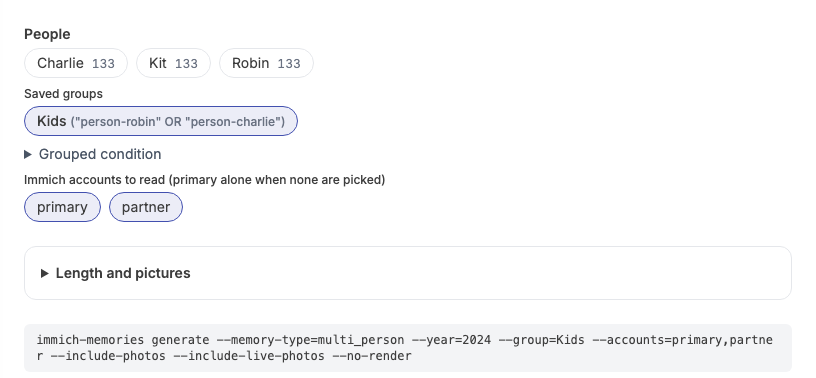
The scope is exact: primary,partner reads both; partner alone excludes your primary.
Omitting accounts reads primary only. Identical files count once, downloads use the owning
account, and either owner's favourite counts. If one selected account cannot be read, the run
stops instead of silently omitting that account’s pictures. A free-text ask
follows the same scope: without --accounts it only searches the primary's pictures.
Albums and trips still use primary only: --accounts is refused for those recipes.
Duplicates and sharing covers the selection rules.
What automation does across accounts
Set the same account scope for daily discovery:
advanced:
  automation:
    accounts: [primary, partner]
Docker equivalent, in environment::
IMMICH_MEMORIES_AUTOMATION__ACCOUNTS: '["primary", "partner"]'
Check the next proposal without making it:
immich-memories auto suggest
Trips stay primary-only. Saved-group films can use both accounts. Automation explains priorities and cooldowns.
Saved groups
Save a repeated people condition, so you don't retype --person every time:
immich-memories people group add "Kids" '"<alex-id>" OR "<sam-jr-id>"'
immich-memories generate --group "Kids" --accounts primary,partner --memory-type multi_person --year 2026
Use store person IDs from people show, so renaming does not break the group. The UI has
Saved groups in People settings and group chips in the memory brief.
The complete group syntax is in the reference.

Someone only the partner account knows
The scan reads primary only, so a partner-only person needs an explicit entry: export the registry, add them with the partner's ID, and import it back. The export/add/import steps are in the reference; Docker users also have the host export and container import commands.
Privacy notes
With local rendering, the partner key goes to its configured Immich server. A configured render worker also receives the keys needed for the selected cut, including partner keys, so that host has access to those libraries. The app reads the selected accounts' owned pictures; partner sharing does not pull in a third person's library. Keys are redacted from logs and diagnostic reports. Uploads always go to the primary account. Account-name rules and fields are in the reference.