Kubernetes + GPU Setup
For Kubernetes clusters with GPU nodes. This is the most advanced setup: if you're not already running K8s, start with Docker instead.
Who this is for
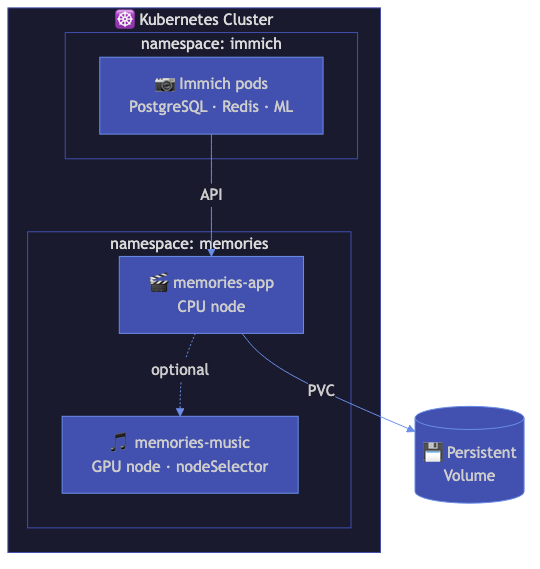
You run a Kubernetes cluster with NVIDIA GPU nodes (on-prem, cloud, or hybrid). You want Immich Memories as a scheduled workload with GPU-accelerated encoding and optional music generation pods.
Architecture
┌─────────────────────────────────────────────────────┐
│ Kubernetes Cluster                                  │
│                                                     │
│  ┌──────────────────────────────────────────────┐   │
│  │ namespace: immich-memories                    │   │
│  │                                               │   │
│  │  ┌────────────┐  ┌────────────┐              │   │
│  │  │ Deployment  │  │ Job        │              │   │
│  │  │ (UI/API)    │  │ (batch     │              │   │
│  │  │ port 8080   │  │  generate) │              │   │
│  │  │ GPU: 1      │  │ GPU: 1     │              │   │
│  │  └────────────┘  └────────────┘              │   │
│  │                                               │   │
│  │  Secret: IMMICH_URL, IMMICH_API_KEY           │   │
│  │  PVCs: cache (20Gi), output (50Gi)            │   │
│  └──────────────────────────────────────────────┘   │
│                                                     │
│  ┌─────────────────┐                                │
│  │ GPU Operator     │  (manages nvidia.com/gpu)     │
│  └─────────────────┘                                │
└─────────────────────────────────────────────────────┘
         │
    ┌────┴─────────┐
    │ Immich server │ (same cluster or external)
    └──────────────┘
Prerequisites
- NVIDIA GPU Operator installed:
helm repo add nvidia https://helm.ngc.nvidia.com/nvidia
helm repo update
helm install gpu-operator nvidia/gpu-operator \
  --namespace gpu-operator \
  --create-namespace
- Storage class available for PersistentVolumeClaims
- Immich accessible from the cluster (same namespace, different namespace, or external)
Deploy with Kustomize
The manifests live in deploy/kubernetes/ in the repo: a CPU-only base/ and an
overlays/gpu/ patch that adds the NVIDIA bits. Detailed manifest reference:
Kubernetes deployment.
cd deploy/kubernetes

# Secret: Immich URL + API key
cp base/secret.yaml.example base/secret.yaml
vim base/secret.yaml

# GPU nodes
kubectl apply -k overlays/gpu
# (CPU only: kubectl apply -k base)
kubectl kustomize overlays/gpu shows the rendered result. base/kustomization.yaml pins the
image tag (no v prefix: release vX.Y.Z is tag X.Y.Z). The checked-in pin trails the current
release — check it against the
releases page and bump it
when you upgrade.
Access the UI
kubectl port-forward -n immich-memories svc/immich-memories 8080:80
Open http://localhost:8080. No Ingress is shipped: enable
authentication first, then copy
base/ingress.yaml.example into place.
GPU resource requests
overlays/gpu/deployment-gpu.yaml requests one nvidia.com/gpu, sets runtimeClassName: nvidia
and the NVIDIA_* env vars. Adjust there:
resources:
  requests:
    nvidia.com/gpu: "1"
  limits:
    nvidia.com/gpu: "1"
The base Deployment keeps 2Gi/1000m requests and 8Gi/4000m limits.
Node selection
The overlay schedules on nodes with nvidia.com/gpu.present=true (set by the GPU Operator) and
tolerates the nvidia.com/gpu taint. If your cluster uses different labels:
nodeSelector:
  nvidia.com/gpu.present: "true"
  # Or your custom label:
  # gpu-node: "true"
For music generation pods (MusicGen/ACE-Step), you might want separate node affinity rules to schedule on nodes with more VRAM.
Batch jobs
Run one-off generation without the UI:
kubectl apply -f base/job.yaml
kubectl logs -n immich-memories -f job/immich-memories-generate
--duration is in seconds (the example job uses 600). The jobs are CPU-only as shipped;
copy the fields from overlays/gpu/deployment-gpu.yaml into the pod spec for GPU nodes. They
share the Deployment's ReadWriteOnce PVCs, so the job pod has to land on the same node — or
skip the CronJobs and set IMMICH_MEMORIES_AUTOMATION__ENABLED=true on the Deployment instead.
Storage
Default PVC sizes:
| Volume | Size | Purpose |
|---|---|---|
| Cache PVC | 20Gi | mounted at /home/immich/.immich-memories: config.yaml, cache.db (analysis scores), video cache, projects, automation history |
| Output PVC | 50Gi | mounted at /app/output: generated videos |
There is no ConfigMap — connection details come from the Secret, everything else from
IMMICH_MEMORIES_* env vars or the UI settings page (which writes config.yaml on the PVC).
cache.db holds the analysis scores from all previous runs. This is the most valuable data: losing it means re-analyzing your entire library. Back it up:
kubectl exec -n immich-memories deployment/immich-memories -- \
  immich-memories cache backup /app/output/cache-backup.db
Secrets management
Don't commit plain secrets to git. Use sealed-secrets or your cluster's secret management:
kubeseal --format=yaml < base/secret.yaml > base/sealed-secret.yaml
kubectl apply -f base/sealed-secret.yaml
Health monitoring
/health/ready returns 200 when config is present and Immich is reachable, 503 otherwise, with a JSON body like:
{
  "status": "ready",
  "configuration": "configured",
  "immich_reachable": true,
  "last_successful_run": "2025-12-15T10:30:00",
  "version": "0.59.2"
}
/health/live only says the process is up. /health returns the same JSON as /health/ready but
always with HTTP 200 (status: ok), so it is useless as a probe — the manifests use
/health/live for liveness and /health/ready for readiness.
Point your monitoring (Uptime Kuma, Prometheus blackbox exporter, etc.) at /health/ready on port 8080.
What works / what doesn't
Same as the Linux + NVIDIA setup: NVENC encoding, CUDA scene analysis, Taichi GPU titles (face detection is CPU on Linux). The Kubernetes layer adds scheduling and PVC-based storage — not scaling: the UI is single-replica.
Performance
Same as bare-metal Linux + NVIDIA. Kubernetes overhead is negligible for this workload.
Do not size the cluster around the encoder. Once NVENC is doing the encode, the encode is not what you wait for: the run is dominated by analysis and selection, meaning downloading every candidate clip from Immich, scoring it, and the LLM passes if you enabled them. In the one run measured end to end (NAS-Only) analysis was 7.4 minutes of 10.1, and a GPU only shrinks the other 2.7. Immich API throughput and LLM latency are the numbers to watch.
Further reading
- Terraform deployment for infrastructure-as-code provisioning
- Kubernetes manifests for detailed manifest reference