NAS-Only Setup (Docker)
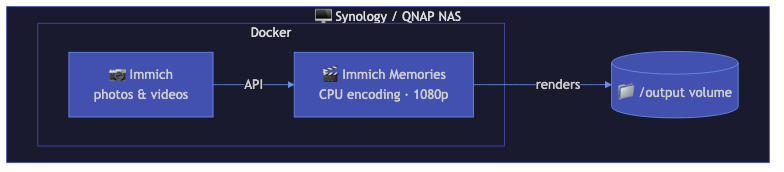
For Synology, QNAP, Unraid, and TrueNAS users running Immich on the same NAS or local network. Docker-only, no LLM, no AI music, CPU encoding.
Who this is for
You have a NAS with Docker support (Synology DSM 7+, Unraid, TrueNAS SCALE, QNAP Container Station). You're already running Immich there. You want memory videos without setting up Python environments or GPU passthrough.
Architecture
┌─────────────────────────────────────────┐
│ NAS (Synology/Unraid/TrueNAS)          │
│                                         │
│  ┌─────────────┐  ┌──────────────────┐ │
│  │   Immich     │  │ Immich Memories  │ │
│  │  (port 2283) │←─│  (port 8080)    │ │
│  │             │  │  CPU encoding    │ │
│  │             │  │  PIL titles      │ │
│  └─────────────┘  └──────────────────┘ │
│                                         │
│  Volumes: config, output, video cache   │
└─────────────────────────────────────────┘
Docker Compose
services:
  immich-memories:
    image: ghcr.io/sam-dumont/immich-video-memory-generator:latest
    container_name: immich-memories
    ports:
      - "127.0.0.1:8080:8080"        # loopback only — see "Reaching the UI" below
    volumes:
      - immich-memories-config:/home/immich/.immich-memories
      - ./output:/app/output          # create it first and chown to the container UID, see below
    environment:
      IMMICH_URL: "${IMMICH_URL}"
      IMMICH_API_KEY: "${IMMICH_API_KEY}"
    restart: unless-stopped
    deploy:
      resources:
        limits:
          memory: 4G
          cpus: "4"

volumes:
  immich-memories-config:
Reaching the UI
The mapping above is loopback-only, so on a headless NAS nothing reaches the UI until you do one
of two things. The cheap one is an SSH tunnel — ssh -L 8080:localhost:8080 your-nas, then open
http://localhost:8080 on your desktop. Nothing is published and there is nothing to secure.
To publish it on the LAN instead, do both halves: turn on
authentication first — the app holds an Immich API key to your
whole photo library — then change the mapping to "8080:8080".
One more thing to get right before the first run:
- Ownership of
./output: the image already writes to/app/output, so the mount above is where the videos land. The container runs as UID/GID 1000. Create the folder yourself (mkdir -p output) so Docker doesn't create it as root; if your NAS user isn't 1000,chown 1000:1000 output. On Synology/QNAP where that is awkward, use a named volume (immich-memories-output:/app/output) anddocker cpthe finished video out — or turn on upload-back to Immich and fetch it there.
.env file
IMMICH_URL=http://immich-server:2283
IMMICH_API_KEY=your-api-key-here
If Immich runs on the same Docker network, use the container name (immich-server). If it's on a different machine or behind a reverse proxy, use the full URL (https://photos.example.com).
What works
- Clip scoring: motion analysis, face detection (CPU-based), favorites boost, audio signals
- Title screens: PIL-based renderer (works everywhere, no GPU needed)
- Custom music: upload your own MP3/WAV in Step 3
- All memory types: year in review, monthly, person spotlight, trips (if GPS data exists)
- Scheduling: set
IMMICH_MEMORIES_AUTOMATION__ENABLED=trueandIMMICH_MEMORIES_AUTOMATION__DAILY_AT=09:00(plusTZ) in the composeenvironment:— the UI process runs the daily decision itself, so there is no cron to install.immich-memories auto installis for host installs and cannot write a cron job inside the container; if you would rather drive it from the NAS host's scheduler, usedocker exec immich-memories immich-memories auto run --quiet --cooldown 24and leave the built-in timer off. See Daily automation - Photo support: Ken Burns animations, face-aware pan, blur backgrounds
What still curates without an LLM
Worth being precise about, because "no LLM" reads like "no curation" and that is not what happens. Only the final review is gated on a model — the rest of the loop is arithmetic over data Immich and the analyzer already produced:
- The verify pass. A clip can reach the cut carrying a metadata guess for a score rather than a real one. Verify finds those, analyses them properly, and re-runs selection. This runs regardless of whether an LLM is configured.
- The mechanical judge. A non-favourite scoring below the floor never ships, and the memory cannot end on a clip that is both its weakest and well under the average — a video should not end on its worst shot. Pure thresholds, no model.
- Event-vs-catalogue detection. A dense day is only promoted as an event if Immich recognised people in enough of it. This is what stops 130 photos of an empty apartment (a property viewing) from beating the month's real days. It reads Immich's existing face recognition, so it costs nothing extra.
- Favourites first. Every favourite in range is taken before anything competes on score, and favourites are exempt from the judge's floor.
- Adaptive coverage. Every month or week in range is guaranteed at least one clip, and a sole representative of a period is protected when the cut is scaled down to fit.
What you actually give up is redundancy detection across the finished cut — two near-identical moments can both survive, because nothing read their descriptions side by side.
What doesn't work
- LLM content analysis: needs a separate LLM server (mlx-vlm, Ollama, vLLM). Without it the pipeline loses the holistic review — the one pass that reads every clip's description together and spots the same birthday candles twice. Everything else in the curation loop still runs; see below.
- AI music generation: MusicGen and ACE-Step need GPU servers. Use custom music upload instead.
- GPU encoding: NAS CPUs (Celeron, Atom, low-end Xeon) don't have usable GPU encoders. Encoding is CPU-only via libx264.
- Taichi GPU title renderer: falls back to PIL. Title screens still look good, just without particle effects and animated gradients.
One switch: preset: fast
Add IMMICH_MEMORIES_PRESET=fast to the compose environment: (or preset: fast at the top of
config.yaml) and the CPU-only profile is on: 1080p H.264 with the fast encoder preset and
medium quality, static title backgrounds instead of animated ones, no per-clip speech analysis,
photos capped at a quarter of the cut, three refinement passes instead of ten, and analysis depth
auto running as fast (favorites first). Every value you set explicitly still wins, and the web
UI's Step 3 shows a banner when the preset is active. immich-memories --preset fast generate …
does the same for one CLI run.
max_refinement_passes is a bill, not just a clock
Selection verifies, judges and reviews in a loop, up to analysis.max_refinement_passes times
(default 10). Three loops share that budget, and each round that changes the cut sends the
descriptions back to the model. On a NAS that is time. If llm.base_url points at a hosted API
rather than a box you own, it is money, and it is the largest single multiplier on what a run
costs you.
preset: fast sets it to 3. Set it yourself to override that either way:
advanced:
  analysis:
    max_refinement_passes: 3     # or 1 to stop after the first pass
or per run: immich-memories generate --refinement-passes 3 …
Lower is cheaper and faster. The cost of lowering it is that a clip admitted by the last refill may ship with less scrutiny than the ones before it.
    environment:
      IMMICH_URL: "${IMMICH_URL}"
      IMMICH_API_KEY: "${IMMICH_API_KEY}"
      IMMICH_MEMORIES_PRESET: "fast"
Performance expectations
One measured number (2026-08-18), so you can calibrate: a monthly memory from a real library,
14 clips (7 videos + 6 photos, HDR iPhone sources), 62 s of 1080p H.264 out, cold cache, the
Docker image with --cpus=4 --memory=4g and no GPU (4 cores of an Apple M5 Max running the
linux/arm64 image):
| Profile | Wall time | Analysis | Render | Output |
|---|---|---|---|---|
preset: fast | 10 min 08 s | 7.4 min | 2.7 min | 30 MB |
| default | 15 min 42 s | 10.1 min | 5.6 min | 87 MB |
Analysis (downloading, downscaling, scoring every candidate clip) is where the time goes, not encoding, and it is cached: a second run of the same month reuses the scores and takes roughly a third as long. A Celeron-class NAS core is a good deal slower than an M5 core, so budget 2–3× these numbers there.
If the render column is what you want to shrink, start with the title screens rather than the encoder: see title rendering is the bottleneck.
Memory usage peaks at about 2-3 GB during encoding. The 4 GB limit in the compose file gives enough headroom. If you're encoding 4K (not recommended on NAS hardware), bump it to 8 GB.
The streaming assembler keeps memory constant regardless of clip count: it processes one clip at a time instead of loading everything into RAM.
Tips for NAS users
- Synology: use Container Manager (formerly Docker). Create the project from the compose file above.
- Unraid: add as a Docker container in the Unraid UI or use Docker Compose Manager plugin.
- TrueNAS SCALE: use the built-in Apps system or deploy via custom Docker compose.
- QNAP: use Container Station with the compose file.
- Keep the video cache enabled (default). It caches downloaded Immich clips locally, so repeat runs skip the download phase. Default cache limit: 10 GB, evicts files older than 7 days.